The Deep Sentinel Home Security system takes a very different approach to home security. The typical home security camera only documents crime. An intruder triggers the camera when they breach your perimeter, and the camera records what’s happening.The camera might set off a local siren, send you a notification, or even let you yell at the perp—provided you didn’t ingore the notification and the crook is still in the camera’s field of view—but all too often, the incident is over before you’re aware of what’s going on.
Home security systems with professional monitoring, meanwhile, typically don’t react until a thief has already gained access to your home, tripping a door, window, or motion sensor inside. To avoid producing false alarms that can needlessly tie up police resources, the professionals monitoring these systems will attempt to contact you first, and then a second or third contact on your list, to ask if you know what’s going on at your home. They’ll call the police eventually, but a lot of bad things can happen in the interim.
The key feature that sets Deep Sentinel apart from other home security systems is that notifications of suspicious activity are sent to human beings whose entire jobs are to monitor and, if appropriate, respond to them. They’ll use two-way audio to order a potential thief to leave the area, and they will call a police dispatcher if needed.
How Deep Sentinel works
The Deep Sentinel starter pack consists of three wireless, battery-powered cameras that create a perimeter around your home. A team of remote Deep Sentinel guards has access to each camera’s live feed. As the cameras’ sensors detect movement from people, animals, cars, and other things on and around your property, AI algorithms process the data to determine what activity is suspicious and what isn’t.
If something is deemed suspicious, the camera turns on its ring of strobing red lights, starts recording video (which is saved to a local hub wired to your network), and pushes a live feed to a Deep Sentinel Surveillance Agent. This person monitors the activity and decides whether or not to take action. Someone delivering a package might not warrant a response, but someone taking a package definitely would. Should the agent decide to intervene, they can either activate the camera’s built-in 104-decibel siren to ward off the intruder or ask them what they’re up to using the camera’s two-way speaker.
The Deep Sentinel system comes with three smart Full HD cameras with motion detection and two-way communication capabilities.
Often either of those options will be enough to curtail any potential wrongdoing, but if the intrusion escalates into an actual crime, the agent can notify local police, and most crucially according to Deep Sentinel founder and CEO David Selinger, give them an accurate description of the person and the particulars of the suspected crime.
Setup and performance
The Deep Sentinel kit comes with three security cameras that have a 130-degree field of view, 1080p resolution, night vision, and two-way audio. The kit also includes a hub and its power cable, three mounting brackets, and a lawn sign and window stickers that let folks know Deep Sentinel has been deployed on the premesis.
The first step is to download the Deep Sentinel app to your phone, as it will guide you through much of the setup process. Then connect the hub to your router with an ethernet cable and power it on. The hub needs to be centrally located indoors, so it can reach all three of the wireless cameras. The manufacturer suggests placing it six to eight feet off the ground (or on a second story, if your home has one). A green LED on the front of the hub blinks while connecting and glows solid when it’s finished.
 Michael Ansaldo/IDG
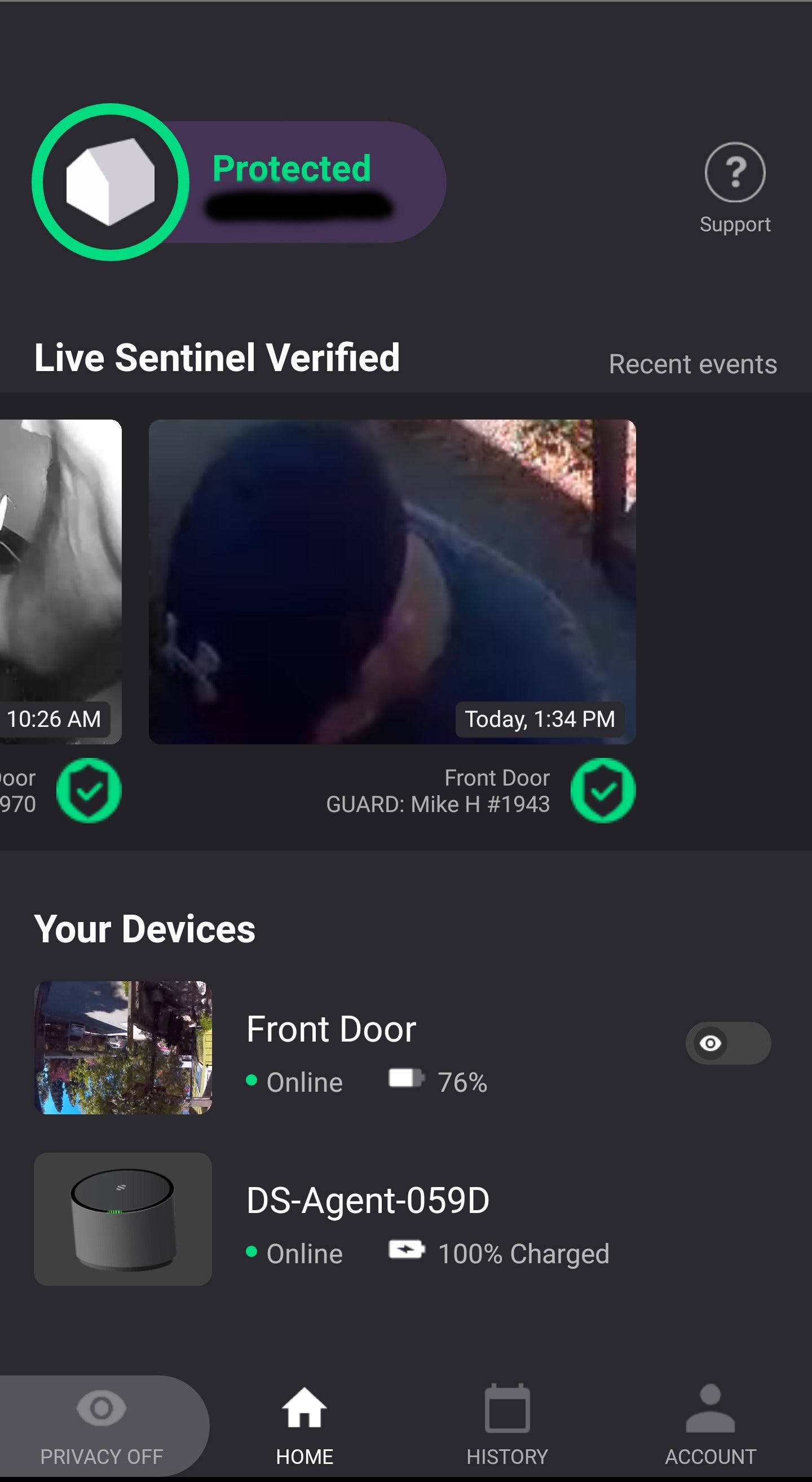
The Deep Sentinel app’s home screen displays recent event, connectivity status, and even the name of the surveillance agent monitoring your feed.
Four batteries are included: one for each camera, plus a spare. The spare battery will need to be charged by placing it inside the hub.
The other three batteries come packaged with the cameras and their mounts. After you put the battery in the camera and power it on, it takes about 30 seconds for the camera to connect to the hub.
If you’re mounting the cameras on a wooden surface, you’ll only need the supplied screwdriver, but if you’re installing them in masonry you’ll need to bring your drill as well. Each mount installs with a single screw and is held in place against the wall by three pressure touch points on the back. You just slide the arm of the mount up to reveal the screw hole, screw it into place, and slide the arm back down.
The camera slides onto the mount and locks with a click, and it can be just as easily removed from the mount by pressing a quick-release button and sliding it off. The mount uses a fixed-pressure ball joint that holds the automatically camera in place at whichever angle you set it.
After each camera is installed, the app prompts you to set a “protection zone” of up to 10 meters (about 30 feet). This involves shaping a boundary box around the area you want the AI to monitor. This step is critical, as any activity in this area could alert Deep Sentinel agents. You’d want to ensure, for example, that the coverage area extends down the walkway from your front door, but not as far as the sidewalk, where any passerby could trigger the camera.
During the setup, you’ll also enter your home address and contact information for local law enforcement, so that Deep Sentinel agents can get the right responders to the right location in the event of a crime. The final step is “agent validation.” Stand in front of a camera and make an “A” formation with your arms over your head. An agent will respond over the speaker to confirm your system is up and running.
 Michael Ansaldo/IDG
The Deep Sentinel live feed shows you exactly what Deep Sentinel’s agents are seeing when they are alerted to activity.
Once the Deep Sentinel system is running, you can check in at any time using the app. The home screen provides most of the details you need to know, including the connection status of the cameras and hub, a carousel of recent events, and the name of the agent currently monitoring your feed. In the History section of the app, you can search all your recorded clips by event type, guard action, or camera location.
Bottom line
Deep Sentinel’s hardware is excellent, and the LiveSentinel agents are friendly and on top of their game. I even received a friendly email alerting me when I inadvertently installed my first camera upside down. Selinger told me some users even get friendly with their agents, greeting them when they arrive home like a member of the family.
But if there are times you don’t want a second set of eyes on things, there is a privacy feature you can activate in the app that hides the camera feeds from the guards while keeping them visible to you. In these instances, the system will function more like other Wi-Fi security cameras, where the onus is on you to respond to activity notifications pushed to your phone.
The Deep Sentinel hardware kit costs $499, plus $49 per month with a one-year contract for the LiveSentinel monitoring service. That’s $588 per year or $490 if you pre-pay for a one-year subscription. Billing starts 30 days after you purchase the system, and the company’s return policy allows you to return the equipment within 30 days for a refund if you’re not satisfied.
After the first year, your subscription will automatically renew on either a month-to-month or annual basis, depending on the plan you signed up for. But you can cancel the service at any time after one year. Additional cameras cost $199 each, but Deep Sentinel tacks on an additional $9.99 per month to your subscription cost for that after the first year. A Wi-Fi range extender that is rated to add an additional 1,000 square feet of coverage is available for $35, but a deploying a mesh router would probably be a better investment.
Deep Sentinel isn’t a perfect security solution, as its cameras only monitor the exterior of your home, and four might not be enough to cover every vulnerable location. The absence of door and window sensors, meanwhile, means that an intruder who successfully evades the cameras could break into your home and not trigger an alarm at all. In fact, it wouldn’t be a bad idea to also deploy a security system with conventional professional monitoring—we’re fans of the Ring Alarm, a DIY solution offering that service for just $10 per month—on top of the Deep Sentinel system.
Even on its own, however, Deep Sentinel is a unique and very innovative camera-based home security system with live monitoring that will do more to protect your home than any other DIY system we’ve evaluated. Highly recommended.


No comments:
Post a Comment