QNAP’s HS-453DX two-bay NAS box weighs in at a hefty $699 MSRP without drives, but it’s a multimedia beast that will not only stream files, but play them directly onto your display or TV via HDMI. Throw in a tiered SSD/HDD structure and 10-gigabit ethernet, and the price starts to make sense, even if it remains daunting to the average user. Also challenging can be the configuration. But if the price and setup don’t phase you, you’ll like this box.
Design and specs
The HS-453DX, like its HS-251 predecessors, looks more like a cable box than your traditional NAS device. Largely because its two 3.5-inch drive bays are laid out horizontally, rather than in the usual vertical arrangement. The unit is also fan-less which makes it very, very quiet. It can also make it very hot, depending on usage and what you use for storage: SSDs or hard drives. As the brushed-metal top of the unit serves as a heat sink, with at least some air flow in the area, thermal problems should not occur.
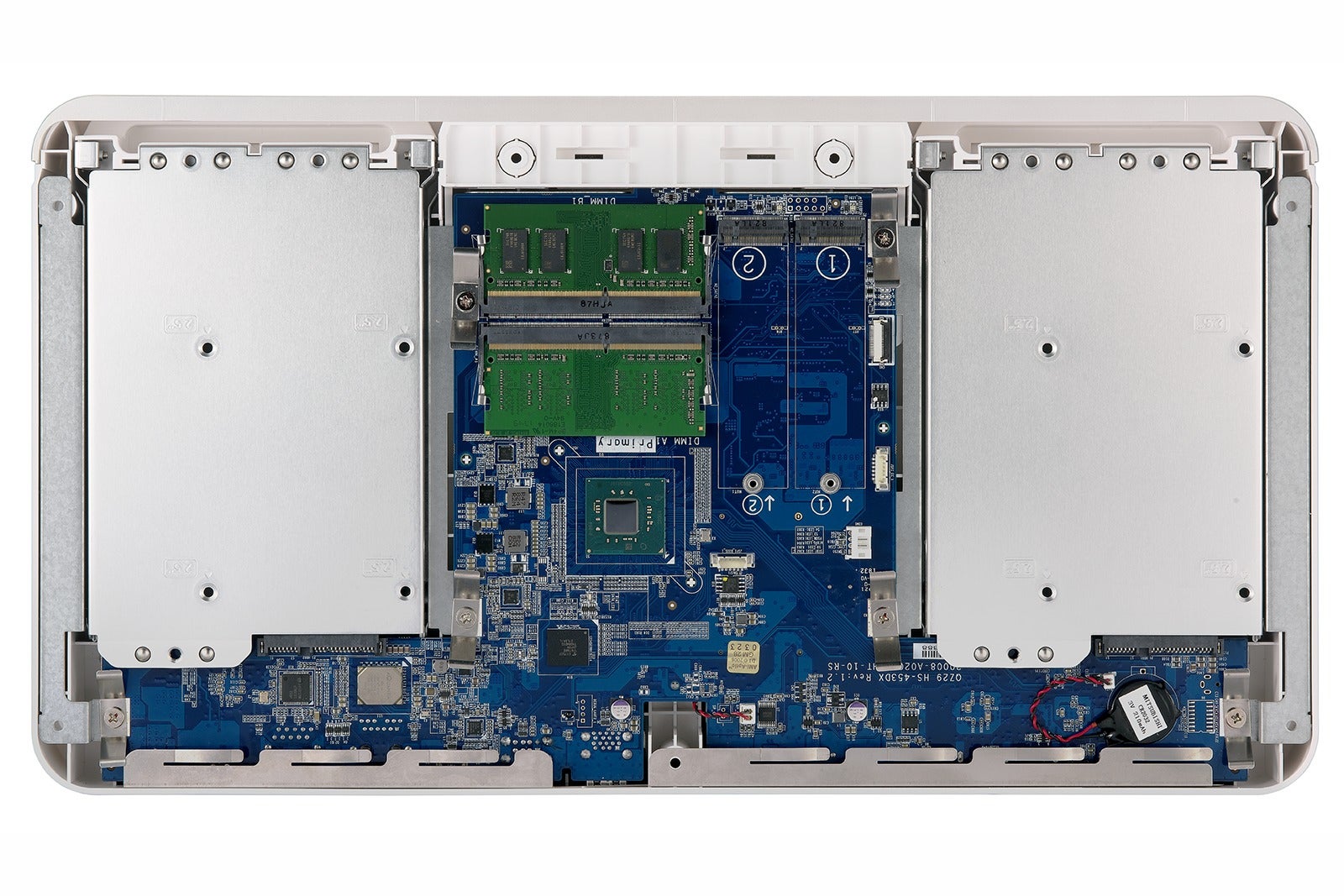
The HS-453DX is actually a four-drive unit if you count the two M.2 slots supporting SATA 6Gbps SSDs. The SSDs can be used for caching, or as normal volumes. The slots are accessed by removing the to top/cover, which is secured by seven short screws accessed from the bottom of the unit.
Tip: You don’t need to remove the screws entirely. If you’re gentle, you can stand the unit upright and add a drive without ever having the screws fall out, and then lay it back down and re-tighten them.
The port array on the back of the HS-453DX looks more like what you’d find on a smart TV than a NAS box’s.
Two ethernet ports are on the back of the unit, the second of which supports 10-gigabit ethernet (that drops to 2.5Gbps if you’re using less than CAT7 cable). There are also two USB 2.0 ports, two Type-A USB 3.0 ports, and a single Type-C USB 3.0 port. Multimedia I/O is supported by two 3.5mm analog audio inputs and a 3.5mm audio output, plus two HDMI 2.0 ports that support video resolution up to (3840 x 2160 pixels at a 60Hz refresh reate).
The HS-453DX is wider than the HS-251 that I’m used to—nearly 16 inches as opposed to just under 12 inches. Both the HS-251 and HS-453DX are about 9 inches deep and a little less than 2 inches tall.
Unlike the largely black HS-251, the HS-453DX is done up in white and the aforementioned brushed metal. Personally, I liked the less obvious look of the older units, as well as the on/off button placement on the back. You must remove the magnetically attached front cover from the HS-453DX to access its on/off switch. Normally, this is not an issue, but I was never able to get the box to power up on a schedule. The HS-251 occasionally suffers this issue as well.
The HS-453DX is powered by an Intel Celeron J4105 quad-core processor 1.5GHz (with burst speeds up to 2.5GHz), which is in turn fed by either 4GB or 8GB of DDR4 memory depending on the configuration you order. The SODIMM slots, like the M.2 slots are also accessible with the top cover off.
 QNAP
QNAPIf this looks like the inside of a PC to you, it is. NAS boxes are basically PCs without peripherals running a server OS. Attach a display, keyboard and mouse, and there you go.
Performance
I tested the HS-453DX in three different configurations: with two 16TB Seagate IronWolf hard drives mirrored in RAID 1; that setup with a Samsung 850 EVO SSD in the first M.2 slot set to cache everything; and then with two 1TB 2.5-inch SATA SSDs running in RAID 0 to see just how fast the box could go.
I connected from the HS-453DX’s Aquantia AQC107 NBase-T/IEEE 802.3bz port directly to an Intel 540-T1 single-port 10GbE adapter card on our testbed and ran CrystalDiskMark 6. I also ran CDM6 on my office gigabit network, but only with the plain mirrored hard drive setup as it still faster than a single gigabit connection can handle.
 IDG
IDG10GbE definitely increases sustained throughput, but we did not see the vast improvement with SSDs that we were expecting.
It was no shock that 10GbE more than doubled the sustained throughput of 1GbE, but I was surprised that the striped SSDs (RAID 0) weren’t faster. I’ve seen 900MBps transfers with SATA SSDs in RAID 0 (via USB 3.x Gen 2) and was expecting, if not that, certainly more than the 380MBps I saw. That said, I also tested a Synology 1618+ with the same drives and saw the exact same results, so this is no slam on the HS-453DX.
380MBps will still deliver a lot more high-definition video than the 118MBps sustained transfer rate that a single gigabit connection maxes out at, but still. Of course, you need 10GbE equipment, which remains quite expensive per port, and is not readily available in consumer grade network gear. A decent 10BASE-T (RJ45) switch costs around $500.
QNAP said that their experience with two SATA SSDs striped in RAID 0 is write speed commensurate with the read numbers I garnered. That was my expectation, but no amount of CrystalDiskMark runs or copy tests altered the results that I’ve published.
A mountain of apps
The HS-453DX can fill a host of roles beyond storage and multimedia playback (QNAP recommends using it as a Roon server, among other things). I use the QNAP in my rack as a central repository for my music, so I can record (with local caching) and edit from several different PCs. It also serves as a TimeMachine destination for several Macs, as well as the WordPress server for my personal website. I’ve also used it as an email server at times. There are more than two dozen backup apps, including clients for many online storage services.
Another major role a QNAP NAS can fill is network video recorder for surveillance. There’s a recording app, Surveillance Station (everything’s a “station” in QNAP-land), that allows you to record up to four video streams for free (the number of free streams varies with the model), with additional licenses available. There’s also a version of Libre Office, YouTube, and lots of other good stuff. You can explore the possibilities at the company’s online app center.
Direct video output
I’ve always found direct HDMI video output from a NAS box more useful for administering the box in a test setup than for delivering multimedia to a TV. Most smart TVs can stream and play back movies, music, and images over the network from any NAS box with a DLNA server, which is what I nearly always wind up doing.
 QNAP
QNAPExploded view of the HS-453DX with the magnetically secure front panel off and the drive trays extended.
As the HS-453DX supports USB TV tuners, however, you can basically roll your own smart TV using it and any dumb display. This could be very handy if you’re really pressed for space and need to use your computer display as your TV.
Not as easy as it should, or could be
The windowed operating system in a browser that QNAP uses to administer their NAS boxes is brilliant. If you know Windows (or macOS, or Linux…) you can use it. Beyond that and things get difficult in a hurry. Part of that is the nature of the beast (it’s a server!), but QNAP doesn’t make things any easier. There are a host of obscure app names such as HybridDesk Station (the HDMI output configuration utility). Then you have tool tips that do nothing but mimic the item name, plus help that often reads more like advertising than help. Even when the help is available, it’s not particularly granular, assuming far too much knowledge for non-IT types.
Normally I give QNAP a pass, because the target audience is generally tech savvy. The HS-453DX, however, has some appeal as a consumer-electronics device, so I thought a warning appropriate—it’s nowhere near easy.
As mentioned, I also had an issue with the HD-453DX waking on schedule, but I’ve had continuing issues with FTP/CIFS/SMB sync operations failing on all my QNAP boxes over time, for reasons that are less than obvious. These won’t affect most users, but they’ve bitten me more than once, and it’s one of the most important roles for a NAS box.
Conclusion
The HS-453DX is fast, can hold a lot of data, and can fill a multitude of roles along with its rather unique multimedia mission. It’s a great NAS box if you can afford it. Please note, however, that you can get much the same experience, including HDMI output and 10GbE via PCIe cards, from cheaper QNAP boxes.
For that matter, just about any NAS box with a DLNA server will suit the average user who’s simply looking to stream multimedia, and those can be had from vendors such as WD and others for much less.
That said, if you have the money and the expertise, I think you’ll like this box.
Note: This article was edited on 8/22/19 to add discussion of similar test results from a completely different NAS box.


No comments:
Post a Comment